
Your dashboard and opportunities
- Audience: Admins
Last updated
Dashboard
Home › Dashboard: "Welcome back, {name}", and where your quotes and opportunities stand today.
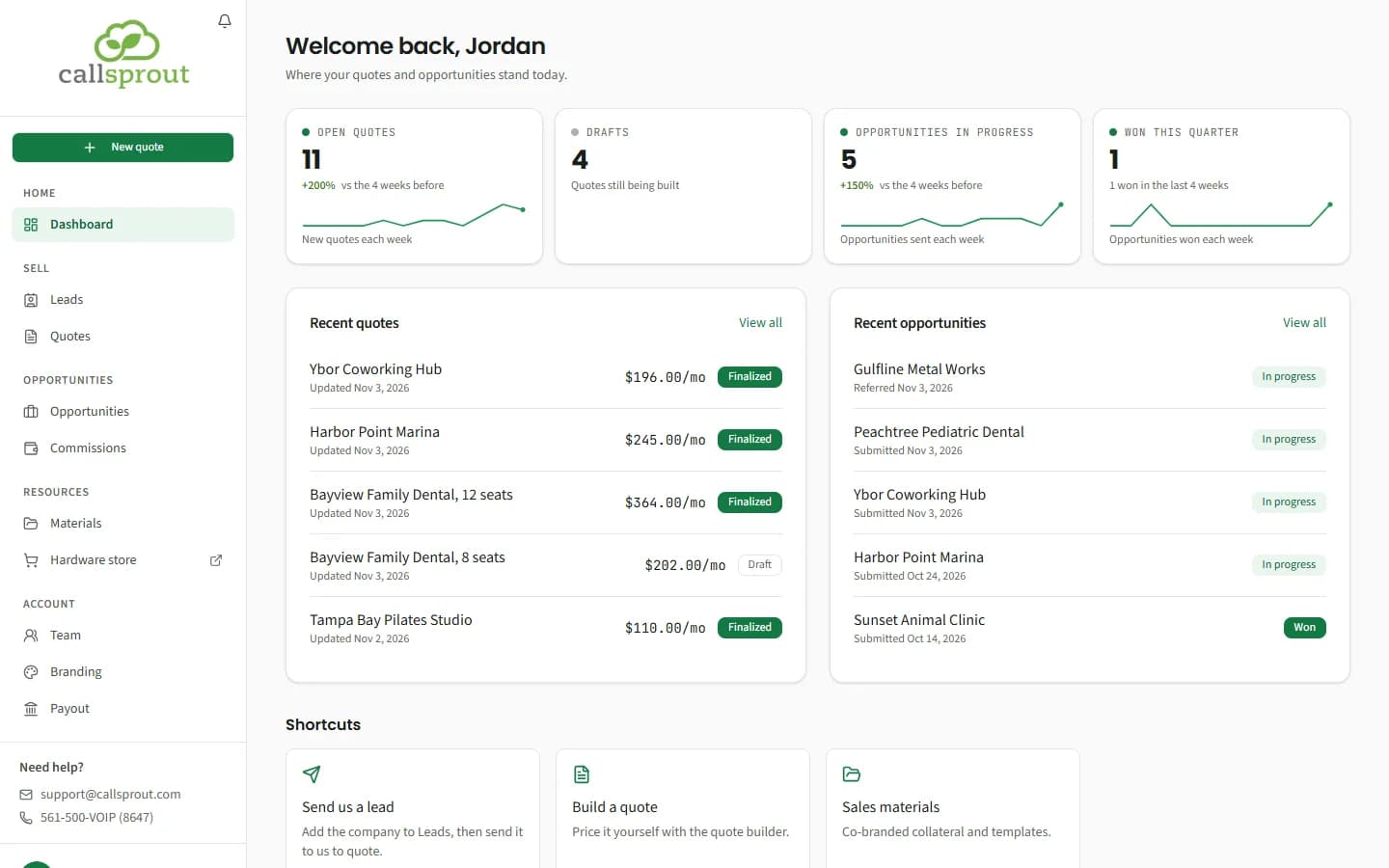
- Open quotes, Drafts, Opportunities in progress and Won this quarter. All but Drafts show a weekly trend line. Click a card to jump to that list.
- Recent quotes: name, last updated, monthly amount, and Draft or Finalized. View all opens Quotes.
- Recent opportunities: company, the date it was submitted (or Referred and the date, for a company you referred to our sales team), where it is with our team (for example Picked up or Out for signature), and its stage. A row sent from a lead opens the lead. View all opens Opportunities.
- Shortcuts: Send us a lead (opens Leads), Build a quote, Sales materials.
Partners see the whole company's numbers. Reps see their own.
Opportunities
Opportunities › Opportunities lists every client you've sent CallSprout and where each one stands. "Every opportunity under your account and where each one stands. Stages update as our team works it." A rep sees "Opportunities you've sent us and where each one stands."
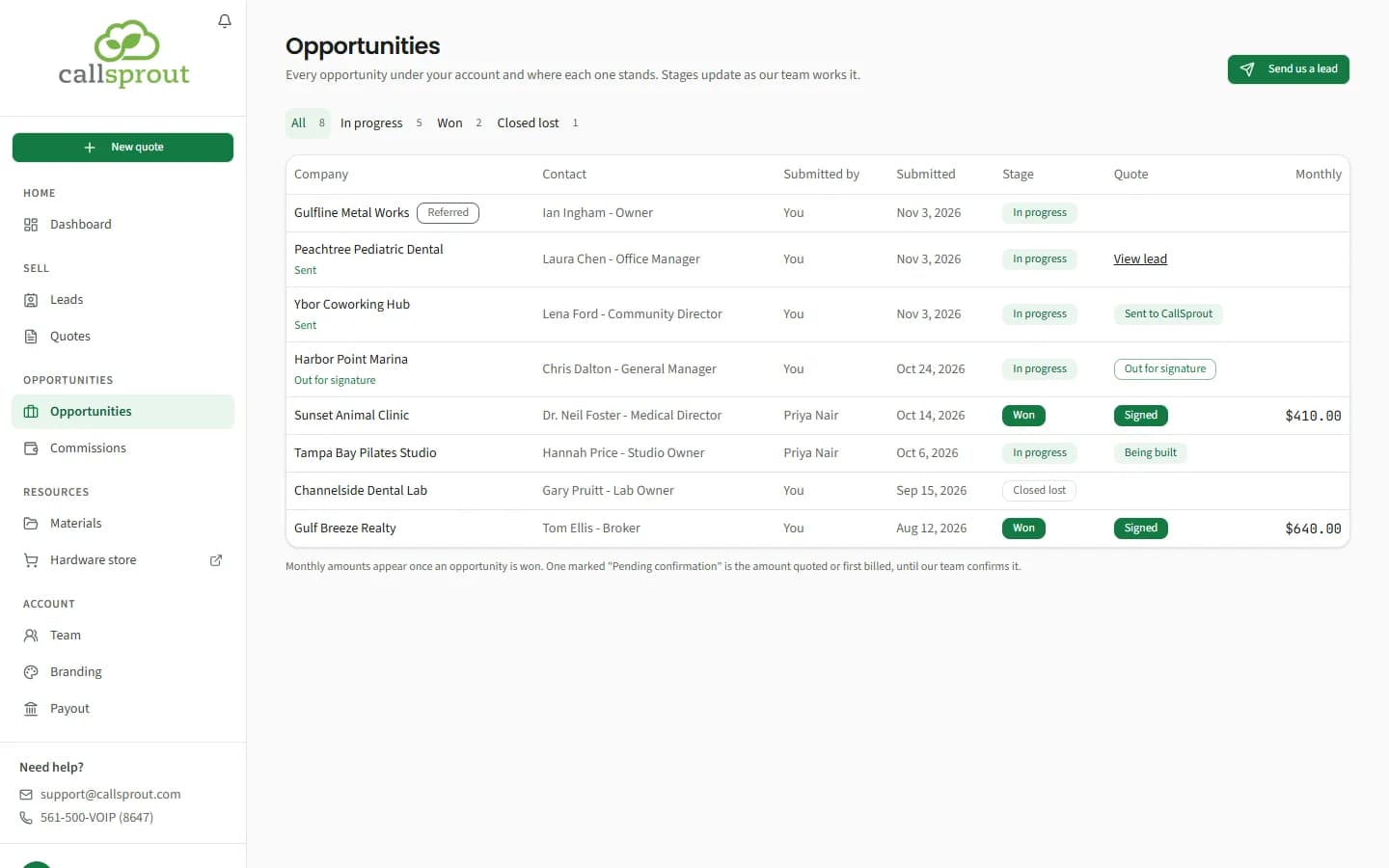
An opportunity shows up here when you send a lead to CallSprout. Older opportunities, sent before leads came to the portal, are listed too. Send us a lead at the top opens Leads.
Filter by stage:
| Stage | Meaning |
|---|---|
| In progress | CallSprout is working it |
| Won | The client signed up with CallSprout |
| Closed lost | It didn't go ahead. If the client changes their mind, open the lead and use Send again. |
| Replaced | A newer version of the quote replaced this opportunity. This filter shows only when you have one. |
Columns:
- Company. A company you referred to CallSprout's sales team carries a Referred badge (see below). For one you sent from a lead, the name opens the lead, and under it is where it is with our team (for example Picked up, Quote built or Out for signature).
- Contact.
- Submitted by: partners only, once a rep has sent something. You means you sent it.
- Submitted.
- Stage.
- Quote: where the agreement is. Click it to open your quote, or the lead when you sent it without a quote.
- Monthly. Monthly amounts appear once an opportunity is won. Until our team confirms the amount, a won opportunity shows the amount quoted or first billed, marked Pending confirmation.
The Quote column's badges:
| Badge | Meaning |
|---|---|
| Sent to CallSprout | We have it |
| Being built | We're preparing the final quote |
| Out for signature | The agreement is with the client to sign. Pricing holds for 60 days. |
| Expired | The 60 days ran out before it was signed |
| Signed | The client signed |
| Not going ahead | Cancelled or declined |
| View quote | A quote that hasn't been sent yet. Opens the quote. |
| View lead | Sent without a quote, and the agreement hasn't gone out yet. Opens the lead. |
The lead itself has more: the agreement and each step of handing the client to our onboarding team. See After you send.
Companies you referred to our sales team
Sometimes you introduce a company to CallSprout's own sales team instead of sending it from your Leads, and our team records you as the partner who referred it. Those companies show:
- on Leads, marked Referred, with CallSprout as the owner, until our team turns them into an opportunity;
- then on Opportunities, marked Referred, with the company, contact, stage, and the monthly amount once won.
They don't open: the quotes, notes and follow-up stay with our team. The primary partner sees them all. A rep sees the ones that came in through a referral link the rep shared in the past.
When a referred client signs or doesn't go ahead
We let you know how it ends, on your notification bell and by email. These go to the partner (your company's primary login), not to reps, once for each opportunity:
| You get | When | What it says |
|---|---|---|
| A client you referred signed: {client} | The client signs with CallSprout | That they're going ahead with CallSprout, the monthly amount when we know it (marked expected until our team confirms it once billing starts) and, if your partnership includes commission, "Any commission on it shows on your Commissions page once it's worked out." |
| A client you referred didn't go ahead: {client} | The client doesn't go ahead with CallSprout | That they didn't go ahead |
| We couldn't take a client you referred forward: {client} | Our team finds it isn't the right fit for CallSprout's services | That it wasn't the right fit, so we haven't taken it forward |
Each one opens Opportunities, where the company's stage has changed to Won or Closed lost. The notice doesn't go into why a client didn't go ahead; ask your CallSprout partner manager if you'd like to know more.
Quote requests your referral link brought in before our sales team started recording them as leads also show on Leads, marked Referred with the stage Sent and the person who asked as the contact, and a line under the company: "From your Get a quote link, date". They don't open either.
A client who opens a referral link you shared sees "Referred by {your company}" on our quote request form, so they know who sent them.
Related articles
Still stuck? Contact support
Our team in West Palm Beach can walk you through it. Tell us your name, your company and what you were trying to do.