
Locations and location admins
- Audience: Admins
Last updated
What a location is
If your company has more than one site at CallSprout, for example a head office and two branches, each one is a location. They all live in one company account in the portal.
The Account switcher is only for separate companies. You don't switch between your own locations: you see the ones you belong to.
Giving someone locations
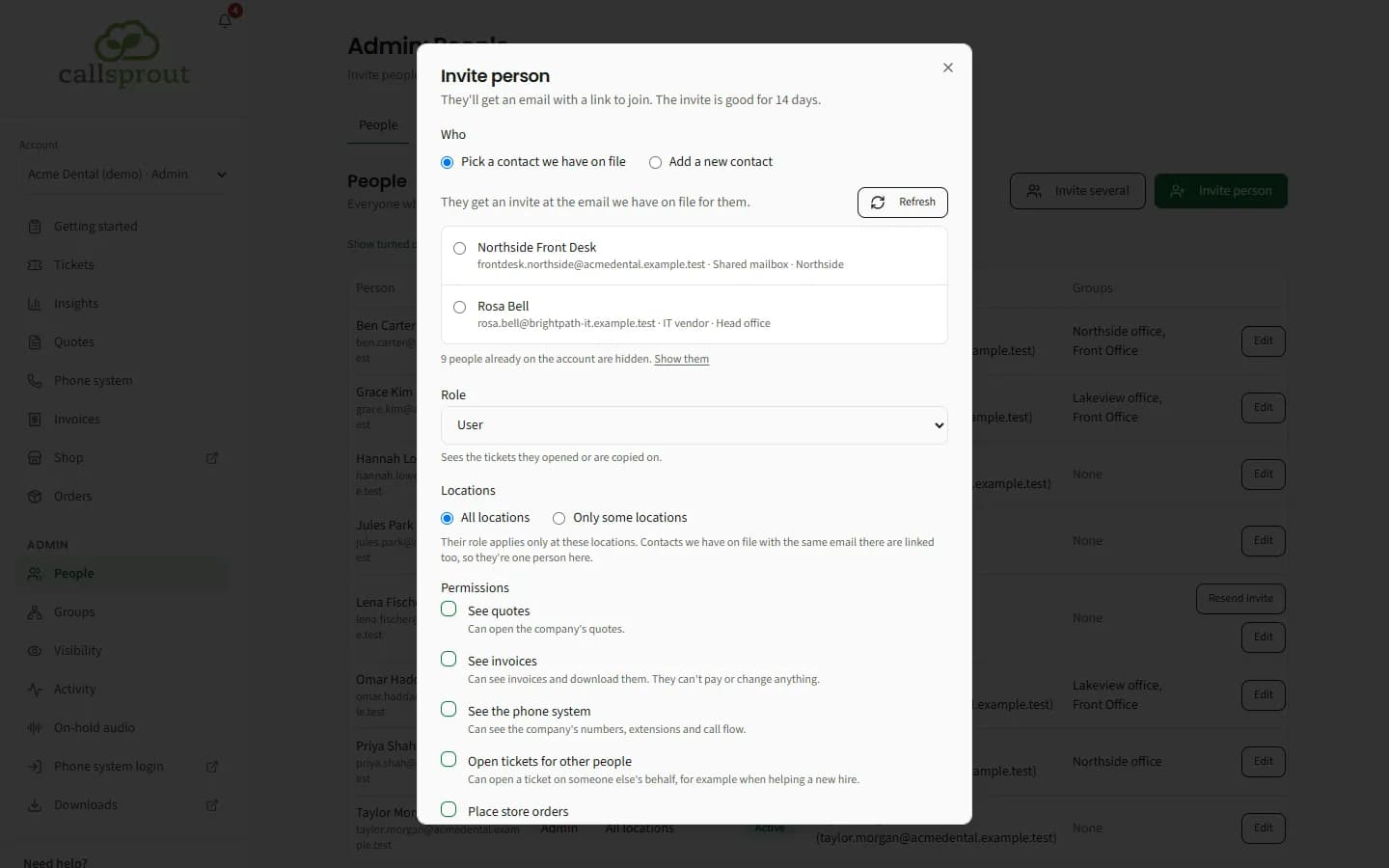
When you invite someone (one person, or several at once: see People) or Edit them, choose their Locations:
- All locations: the whole company.
- Only some locations: tick the ones they belong to.
Their role applies only at those locations. When you pick locations, their CallSprout contacts with the same email at those locations are linked too. Changing someone's locations later leaves their linked contacts as they are.
If you see "They have no active contact at the locations you picked…", that person isn't on CallSprout's records at those locations yet. Pick another location, or add them there as a new contact (Add a new contact when inviting).
What locations limit
Nobody ever sees anything outside their own locations:
| Area | What changes |
|---|---|
| Tickets | Only tickets at their locations. With more than one location, the list has a Location filter ("All my locations" or one), each ticket shows its location, and New ticket asks which location it's for. |
| Insights | Numbers cover their locations |
| Quotes, Invoices and Balance | Only their locations' quotes, invoices and balances. Invoices has a location picker; see Choosing a location in Invoices and payments. Billing tickets follow the same locations. |
| Store and Orders | They can order only for their locations |
| Ticket templates | The Location field offers only their locations |
| Visibility rules | Can't reach past their locations |
| Phone system | Nothing, unless your account keeps the phone system to people with All locations. Then someone limited to some locations can't open Phone system or Phone system login at all (see Phone system). |
When your account keeps the phone system to people with All locations, Admin › People says so above the list, and so does the Locations choice when you invite or edit someone: "On this account, people limited to some locations can't open the phone system. Only people with All locations can." CallSprout sets this for your account; ask us if you'd like it changed.
Location admins
An admin limited to some locations is a location admin. They do everything an admin does, for their locations only:
- People: they see only people whose locations are all within theirs. They can give only their own locations, never All locations.
- Groups: they see location groups for their own locations, and teams whose people are all theirs.
- Visibility: they can't make "Everyone in the company" rules.
- Orders and requests: they see every order and request for their locations, plus their own.
- Activity: scoped to what they can see.
- They can't change their own locations.
Keep an admin of all locations
The account must always have at least one active admin of All locations. The portal won't let you demote, narrow or turn off the last one. Make someone else an admin of all locations first.
When a location becomes its own company
Sometimes a location turns out to be a separate business. CallSprout can move it out into its own portal account. When that happens:
- that location's tickets, requests, orders and payments go with it;
- people on your account are no longer linked to it;
- anyone left with no location is turned off, marked "Their only location moved to its own account".
Location groups for it stay as portal-only groups, and visibility rules pointing at it are removed. CallSprout can bring your people across to the new account, keeping their sign-in or sending them an invite.
Related articles
Still stuck? Contact support
Our team in West Palm Beach can walk you through it. Tell us your name, your company and what you were trying to do.