
Sign in to the client portal and switch accounts
- Audience: End users
- Audience: Admins
Last updated
Your invite
You get access when an admin at your company (or CallSprout) invites you. The invite email comes from CallSprout, with a link to the portal. There's no password to set up: sign in with the email address the invite was sent to, as below. An invite is open for 14 days. If it runs out, ask whoever invited you to send it again.
Signing in
There are no passwords. You sign in with your email address and a code:
- Go to the portal. The sign-in box says CallSprout client portal.
- Enter your email address: the one your invite was sent to.
- Check your email for a six-digit code, then type or paste it into the sign-in box.
Once you're in, you land on Getting started if your company is new to CallSprout and something there is still yours to fill in (see Getting started). Otherwise you land on Tickets.
The code works for 10 minutes. If it hasn't arrived after a minute or two, check your spam or junk folder. If it's expired or never came, ask for a new code on the same screen (you can ask again 30 seconds after the last one). Still stuck? Email support@callsprout.com.
The portal opens only from the United States. If you're traveling abroad, or your connection goes out through another country (some VPNs and company networks do this), you'll see a CallSprout page headed We can't open this from your location instead of the sign-in box. It gives our phone number, 844.889.8647, and support@callsprout.com. Try again from a US connection, or call or email us and we'll help.
A link CallSprout emails you to view a quote, or to fill in a form about your order, opens from anywhere, so you can still read it while you're away. The portal itself stays US only.
Accepting or declining an invite
When a company invites you, a card appears at the top of the page: "{Company} invited you to their CallSprout portal".
- Accept to join. Nothing is shared with you until you do.
- Decline to refuse. You'll be asked to confirm ("Decline invite" / "Keep it").
- Expired invites disappear. If one runs out while you have the page open, it says so, with a Dismiss button.
If you've been invited but haven't joined any company yet, the invites fill the whole page under You've been invited.
Working for more than one company
One person can be on several company accounts (for example, someone who manages IT for two businesses). When you are:
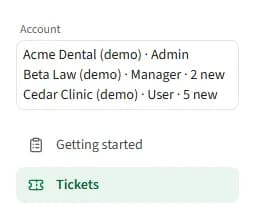
- The top of the sidebar shows an Account switcher instead of the company name. On a phone, open the menu first. Each option names the company and your role there, plus your locations if you're limited to some, for example "All Saints · Admin, All Saints Preschool".
- When you have unread alerts on a company, its option ends with how many, for example "Beta Law · Manager · 2 new". It's the same number that company's bell shows you, so you can see a reply or an invoice waiting on another company before you switch. A company with nothing unread shows no number.
- Pick the company you want to work on. Your browser remembers the choice.
- If you're halfway through writing a ticket, switching asks first, because the draft would be lost.
- Switching from inside a ticket, quote or order takes you back to that list, since the item belongs to the other company.
Locations within one company (a head office and its branches, say) aren't separate accounts. They're handled by your locations, not the switcher.
Your profile and signing out
Click your name at the bottom of the sidebar for:
- Profile picture: shown beside your name in the portal. PNG, JPG or WebP, up to 5 MB.
- Dark mode / Light mode.
- Sign out. Signing out also clears any form drafts this browser was keeping, which matters on a shared computer.
Messages you might see
| Message | What it means | What to do |
|---|---|---|
| Your account isn't set up yet | You're signed in, but you aren't on any company yet | Contact CallSprout, or ask your company's admin to invite you |
| Choose an account | The company you last used isn't available to you any more | Pick one of your other accounts |
| Your access isn't set up yet | You're signed in, but your login isn't connected to a CallSprout portal yet | Call 844.889.8647 or email support@callsprout.com (both are on the page). I'm a client and my account isn't set up calls us too. I want a quote opens our Get a quote form, and Sign Out signs you out. |
| Account Deactivated | Your login has been switched off | Ask your company's admin, or CallSprout |
| Access Denied | You're already signed in with a login that isn't a client login (for example a partner login) and opened a portal page | Sign out and sign in with the email your invite went to |
| We couldn't load your account right now | A temporary problem | Use the retry button. If it keeps happening, contact support |
| We can't open this from your location | You're opening the portal from outside the United States, or through a VPN or network that leaves the US elsewhere | Open it again from a US connection. If you're in the US and still see it, call 844.889.8647 or email support@callsprout.com |
If you sign in from a portal link with a different kind of login, you're taken to that login's own home page rather than an error.
Related articles
Still stuck? Contact support
Our team in West Palm Beach can walk you through it. Tell us your name, your company and what you were trying to do.